
Servlet Filter 와 Spring Interceptor
웹과 관련된 공통 관심사는 AOP를 사용할 수도 있지만 서블릿 필터 또는 스프링 인터셉터를 사용하는 것이 좋다.
웹도 관련된 공통 관심사를 처리할 땐, HTTP의 헤더나 URL의 정보들이 필요한데, 서블릿 필터나 스프링 인터셉터는 HttpServletRequest를 제공한다.
서블릿 필터
서블릿 필터 흐름
HTTP 요청 -> WAS -> 필터 -> 서블릿 -> 컨트롤러
- 여기서 말하는 서블릿은 스프링 디스패처 서블릿이다.
필터 제한
HTTP 요청 -> WAS -> 필터 -> 서블릿 -> 컨트롤러  //로그인 사용자
HTTP 요청 -> WAS -> 필터(적절하지 않은 요청이라 판단, 서블릿 호출 X)  //비로그인 사용자
필터 체인
HTTP 요청 -> WAS -> 필터1 -> 핉터2 -> 필터3 -> 서블릿 -> 컨트롤러
- 필터는 순서를 지정하여 자유롭게 구성할 수 있다.
사용예시
LogFilter
@Slf4j
public class LogFilter implements Filter {
    @Override
    public void init(FilterConfig filterConfig) throws ServletException {
        log.info("log filter init");
    }

    @Override
    public void doFilter(ServletRequest request, ServletResponse response, FilterChain chain) throws IOException, ServletException {
        log.info("log filter doFilter");

        HttpServletRequest httpRequest = (HttpServletRequest) request;
        String requestURI = httpRequest.getRequestURI();

        String uuid = UUID.randomUUID().toString();

        try {
            log.info("REQUEST [{}][{}]", uuid, requestURI);
            chain.doFilter(request, response);
        } catch (Exception e) {
            throw e;
        } finally {
            log.info("RESPONSE [{}][{}]", uuid, requestURI);
        }
    }

    @Override
    public void destroy() {
        log.info("log filter destroy");
    }
}
WebConfig
@Configuration
public class WebConfig {

    @Bean
    public FilterRegistrationBean logFilter() {
        FilterRegistrationBean<Filter> filterRegistrationBean = new FilterRegistrationBean<>();
        filterRegistrationBean.setFilter(new LogFilter());
        filterRegistrationBean.setOrder(1);
        filterRegistrationBean.addUrlPatterns("/*");

        return filterRegistrationBean;
    }
}
스프링 인터셉터
스프링 인터셉터 흐름
HTTP 요청 -> WAS -> 필터 -> 서블릿 -> 스프링 인터셉터 -> 컨트롤러
- 여기서 말하는 서블릿은 스프링 디스패처 서블릿이다.
스프링 인터셉터 제한
HTTP 요청 -> WAS -> 필터 -> 서블릿 -> 스프링 인터셉터 -> 컨트롤러
HTTP 요청 -> WAS -> 필터 -> 서블릿 -> 스프링 인터셉터(적절하지 않은 요청이라 판단, 컨트롤러 호출 X)  //비로그인 사용자
스프링 인터셉터 체인
HTTP 요청 -> WAS -> 필터 -> 서블릿 -> 인터셉터1 -> 인터셉터2 -> 컨트롤러
- 스프링 인터셉터도 체이닝 기능을 사용할 수 있다.
스프링 인터셉터 인터페이스
public interface HandlerInterceptor {
     default boolean preHandle(HttpServletRequest request, HttpServletResponse response,
            Object handler) throws Exception {}

     default void postHandle(HttpServletRequest request, HttpServletResponse response,
            Object handler, @Nullable ModelAndView modelAndView) throws Exception {}

     default void afterCompletion(HttpServletRequest request, HttpServletResponse
            response, Object handler, @Nullable Exception ex) throws Exception {}
}
- 서블릿 필터의 경우 단순하게
doFilter()하나만 제공되나, 인터셉터는 컨트롤러 호출 전(preHandle), 호출 후(postHandle), 요청 완료 이후(afterCompletion)와 같이 단계적으로 잘 세분화 되어 있다. - 서블릿 필터의 경우 단순히
request,response만 제공했지만, 인터셉터는 어떤 컨트롤러(handler)가 호출되는지 호출 정보도 받을 수 있다. 그리고 어떤modelAndView가 반환되는지 응답 정보도 받을 수 있다.
스프링 인터셉터 호출 흐름
스프링 인터셉터
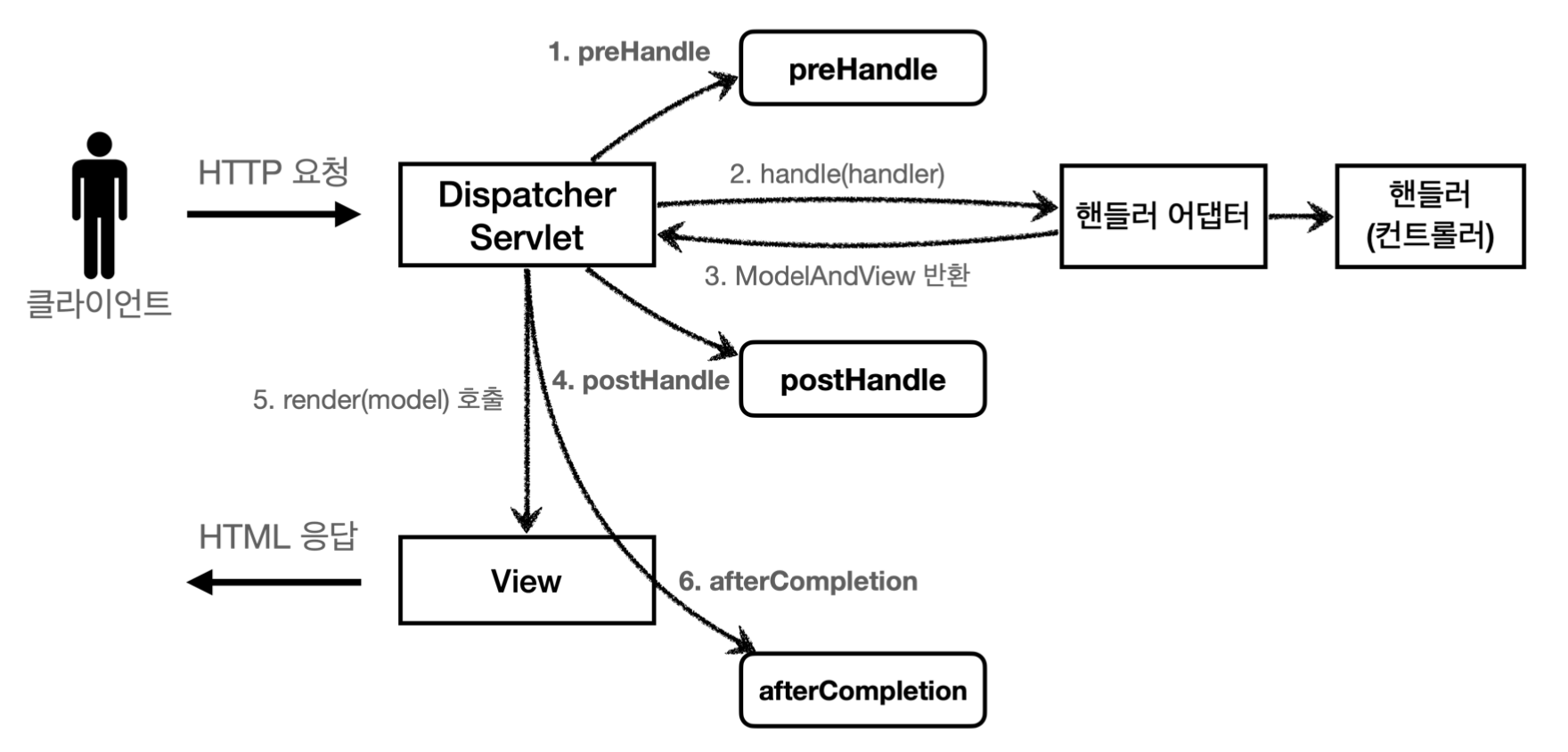 정상 흐름
정상 흐름
preHendle: 컨트롤러 호출 전에 호출된다. (핸들러 어댑터 호출 전)preHandle의 응답값이true이면 다음으로 진행하고,false이면 더는 진행하지 않는다.false인 경우 남은 인터셉터는 물론이고, 핸들러 어댑터로 호출되지 않는다. 그림 1번에서 끝나버린다.
postHandle: 컨트롤러 호출 후에 호출된다. (핸들러 어댑터 호출 후)afterCompletion: 뷰가 랜더링 된 이후에 호출된다.
스프링 인터셉터 예외 상황
스프링 인터셉터 예외
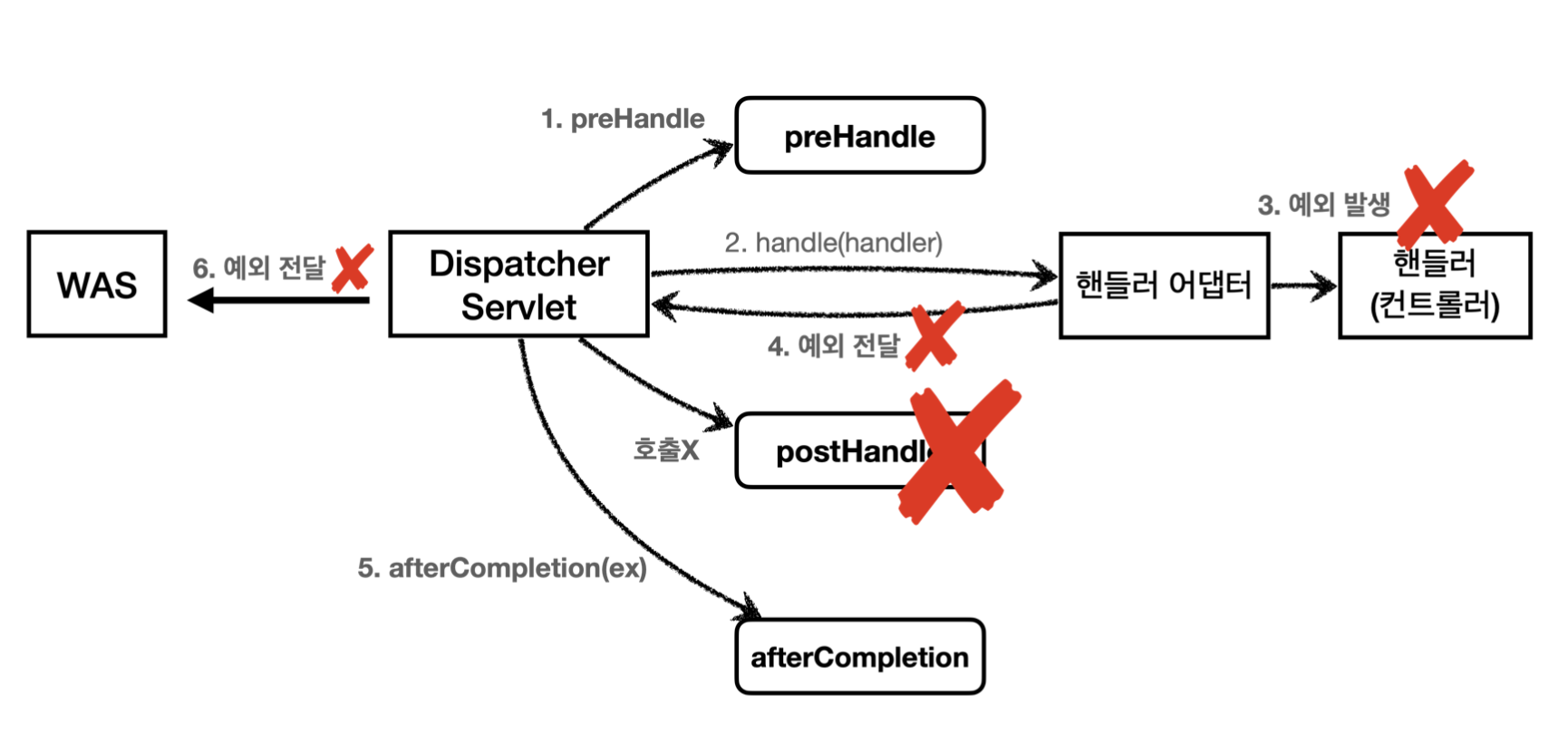 예외가 발생시
preHandle: 컨트롤러 호출 전에 호출된다.postHandle: 컨트롤러에서 예외가 발생하면postHandle은 호출되지 않는다.afterCompletion:afterCompletion은 항상 호출된다. 이 경우 예외(ex)를 파라미터로 받아서 어떤 예외가 발생했는지 로그로 출력할 수 있다.
afterCompletion은 예외가 발생해도 호출된다.
- 예외가 발생하면
postHandle()는 호출되지 않으므로 예외와 무관하게 공통 처리를 하려면afterCompletion()을 사용해야 한다. - 예외가 발생하면
afterCompletion()에 예외 정보(ex)를 포함해서 호출된다.
스프링 인터셉터 사용 예시
인터셉터
@Slf4j
public class LogInterceptor implements HandlerInterceptor {

    public static final String LOG_ID = "logId";

    @Override
    public boolean preHandle(HttpServletRequest request, HttpServletResponse response, Object handler) throws Exception {

        String requestURI = request.getRequestURI();
        String uuid = UUID.randomUUID().toString();

        request.setAttribute(LOG_ID,  uuid);

        if(handler instanceof HandlerMethod) {
            HandlerMethod hm = (HandlerMethod) handler; //호출할 컨트롤러 메서드의 모든 정보가 포함되어 있다.

        }

        log.info("REQUEST [{}][{}][{}]", uuid, requestURI, handler);
        return true;
    }

    @Override
    public void postHandle(HttpServletRequest request, HttpServletResponse response, Object handler, ModelAndView modelAndView) throws Exception {
        log.info("postHandle = [{}]", modelAndView);
    }

    @Override
    public void afterCompletion(HttpServletRequest request, HttpServletResponse response, Object handler, Exception ex) throws Exception {
        String requestURI = request.getRequestURI();
        String logId = (String) request.getAttribute(LOG_ID);

        log.info("RESPONSE [{}][{}][{}]", logId, requestURI, handler);
        if(ex != null) {
            log.error("afterCompletion error!!", ex);
        }
    }
}
WebConfig
@Configuration
public class WebConfig implements WebMvcConfigurer {

    @Override
    public void addInterceptors(InterceptorRegistry registry) {
        registry.addInterceptor(new LogInterceptor())
                .order(1)
                .addPathPatterns("/**")
                .excludePathPatterns("/css/**", "/*.ico", "/error");

    }
}
----docs.spring.io----
? 한 문자 일치
* 경로(/) 안에서 0개 이상의 문자 일치
** 경로 끝까지 0개 이상의 경로(/) 일치
{spring} 경로(/)와 일치하고 spring이라는 변수로 캡처
{spring:[a-z]+} matches the regexp [a-z]+ as a path variable named "spring" {spring:[a-z]+} regexp [a-z]+ 와 일치하고, "spring" 경로 변수로 캡처
{*spring} 경로가 끝날 때 까지 0개 이상의 경로(/)와 일치하고 spring이라는 변수로 캡처
 /pages/t?st.html — matches /pages/test.html, /pages/tXst.html but not /pages/
 toast.html
 /resources/*.png — matches all .png files in the resources directory
 /resources/** — matches all files underneath the /resources/ path, including /
 resources/image.png and /resources/css/spring.css
 /resources/{*path} — matches all files underneath the /resources/ path and
 captures their relative path in a variable named "path"; /resources/image.png
will match with "path" → "/image.png", and /resources/css/spring.css will match
with "path" → "/css/spring.css"
 /resources/{filename:\\w+}.dat will match /resources/spring.dat and assign the
 value "spring" to the filename variable